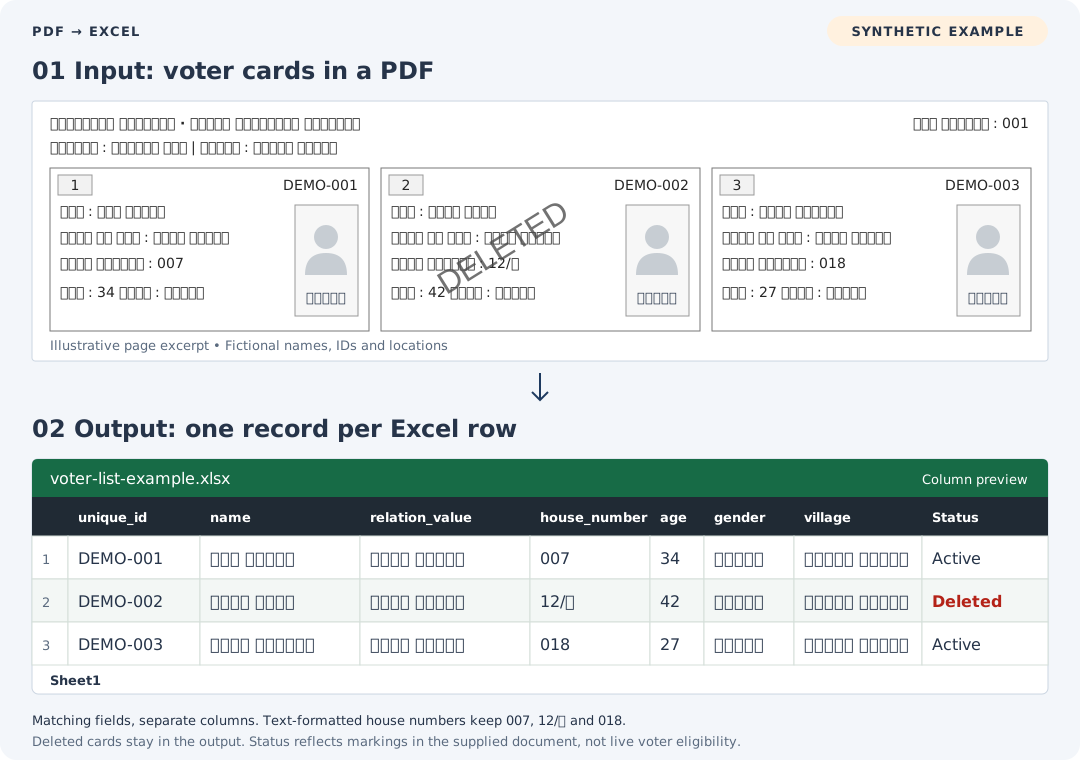
What you get in your Excel file
Get an Excel workbook with one row per voter record and separate columns you can sort, filter and check against your electoral-roll PDF. We agree the output fields after checking your file.
| Field group | Columns available when present in the source |
|---|---|
| Identity | EPIC / voter ID number, name |
| Voter details | Age, gender, relative name and relationship type |
| Address | House number, village and other printed address details |
| Location | Panchayat, tehsil, district, assembly constituency, part or section, as agreed |
| Record reference | Serial number and source references, as agreed |
| Status | Active / Deleted, based on explicit markings in the supplied roll |
| Language | Source-language text; transliteration or translation where agreed |
Ask for identifiers and house numbers to be formatted as text so Excel retains leading zeros, slashes and letters. OCR recognition and spreadsheet formatting are separate checks: compare important values with your PDF.
Request a Status column to distinguish records marked deleted in the source. Deleted records remain as rows, rather than being silently removed. Status describes the supplied publication; it is not a live check of voter eligibility. Agree how unclear markings will be reviewed before processing.
How PDF-to-Excel conversion works
1. Send one representative PDF. Add the state and approximate page count if you know them. You do not need to prepare a full specification to start.
2. Confirm the output. We check the layout and readable fields, discuss language requirements, and agree the columns and file organisation.
3. Approve the quote. We confirm the price and delivery plan before the full batch starts. Quoting, questions and file delivery take place over WhatsApp.
Pricing and delivery
This is a paid conversion service. The quote depends on the number of PDFs or pages, layout consistency, scan quality, requested columns, and any transliteration or translation work.
Send a representative file for each different layout in your batch. Include your deadline so we can confirm a delivery plan for that scope. A batch price or completion time is agreed after the files are reviewed.
The illustration above shows the output format. If you want a conversion sample from your own PDF, ask us to confirm the sample scope and any charge before work begins.
Voter list conversion questions
Can you convert a scanned voter list PDF?
Scanned pages can be processed with OCR. Readability depends on the scan: blur, skew, faint text and damaged pages can affect the extracted fields. Send a representative PDF so we can check your layout before quoting the batch.
Can I keep Hindi, Marathi or other source-language text?
Tell us the language of your roll. We check your file and confirm the output options. Source-language text can remain in its own columns, with transliteration or translation added separately where agreed. Transliteration changes the script; translation changes the language.
How should I check the converted Excel file?
Compare names, EPIC numbers, house numbers and a selection of complete rows with the source PDF. Count checks help identify possible omissions, but do not prove every field is accurate. OCR can misread individual characters even when the row count matches.
What happens if a field is unreadable?
We discuss how missing or uncertain fields should be handled when agreeing the output. Clearer source files may be needed. A value missing from the PDF cannot be recovered simply by converting it to Excel.
Can you process several parts or a large batch?
Send the approximate PDF or page count and one example of each layout. Tell us whether you need separate workbooks or a combined workbook, and which part or source references you need to retain. We confirm the organisation and price before starting.
Do you provide a ready-made voter list in Excel?
We convert PDFs that you supply and are authorised to use. To obtain a roll, use the official ECI Voters' Service Portal or your state's Chief Electoral Officer. AlgoOCR is an independent conversion service and is not affiliated with the Election Commission of India.
Send your PDF for a quote
Start with one PDF. State, page count, language, required columns and deadline are helpful if you know them. We will work through the remaining details with you.